
See every seller's stockbefore you source, price or list.
Click AmzCompanion on any Amazon product page and you'll see every offer on the listing with the seller's estimated stock. The totals split into FBA, FBM and Amazon, so you know who you're really up against.
Also on Firefox. No card needed to start the trial.
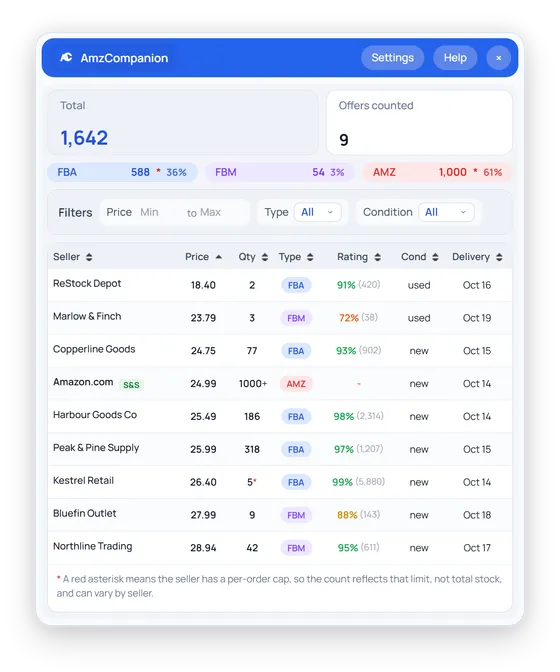
Amazon's share
61% of units
Kestrel Retail
5 per order
Counted on this listing
1,642 units · 9 offers
Every seller, counted
Every offer on the listing gets an estimated unit count, and they're added up into one total.
FBA, FBM and Amazon apart
Units and share for each channel show you who actually holds the stock.
Right on the product page
Click the button in the buy box of the listing you're already on and read the answer there.




















 Firefox
From install to an answer in four steps.
Everything happens on the product page you're already looking at.
01
Add the extension
Install it from the Chrome Web Store or Firefox Add-ons, then pin it so the icon stays in reach.
Chrome and Firefox
02
Activate this browser
Open the dashboard and click the link we email you. Your 14-day trial starts there, and you won't need a card.
14-day trial
03
Open any listing
Go to a product page on any supported storefront and click the AmzCompanion button in the buy box.
20 Amazon storefronts
04
Read the counts
Offers fill in as each count comes back. Sort or filter the table and the totals follow.
Counts arrive one by one
Know who you're up against before you buy in.
Click AmzCompanion on a listing and the panel fills in seller by seller, with how many units each one can sell right now.
- Total units on the listing and how many offers went into it
- FBA, FBM and Amazon units, each with its share
- Seller rating, condition and delivery date for every offer
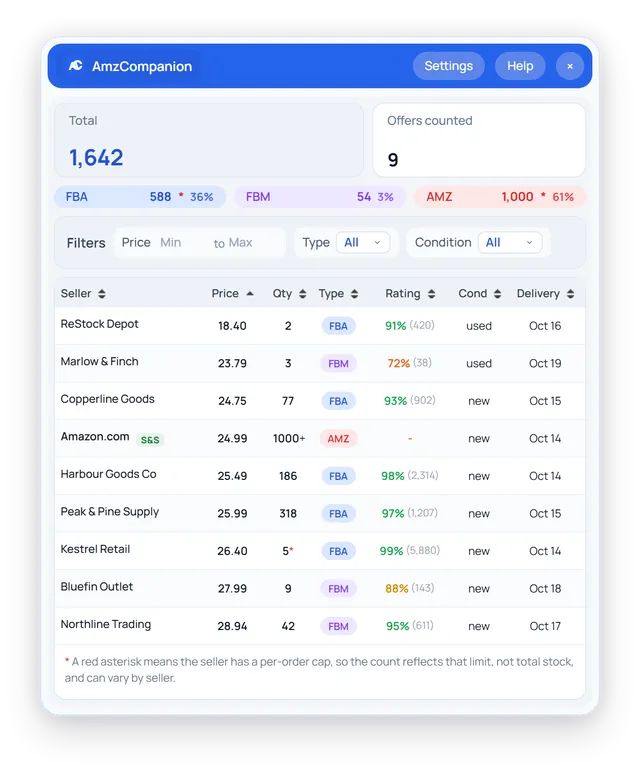
Cut the list down to the offers you compete with.
Set a price range or keep only FBA offers, and the totals and channel split update to match.
- The price filter uses price plus shipping
- The FBA filter keeps Amazon's own offer in
- Every column sorts, from price to delivery date
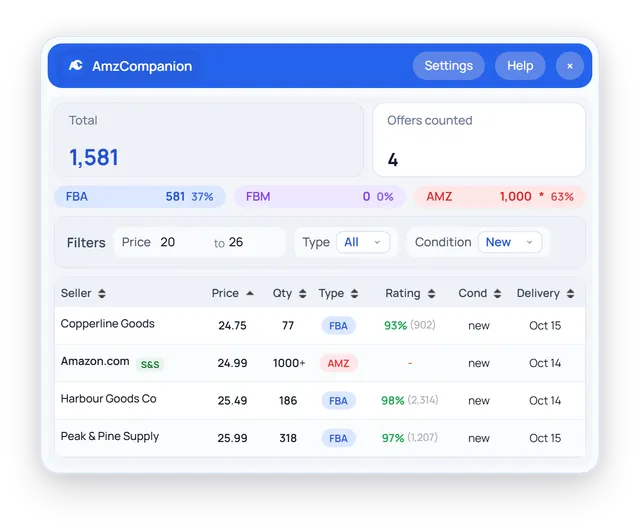
Counts that tell you when they're a minimum.
Amazon caps how high a count can go, and some sellers limit how many you can buy at once. AmzCompanion marks both, so you know which numbers are a minimum.
- 1000+ when a count reaches Amazon's ceiling
- A red asterisk when a seller caps quantity per order
- The same mark on any channel total that includes one
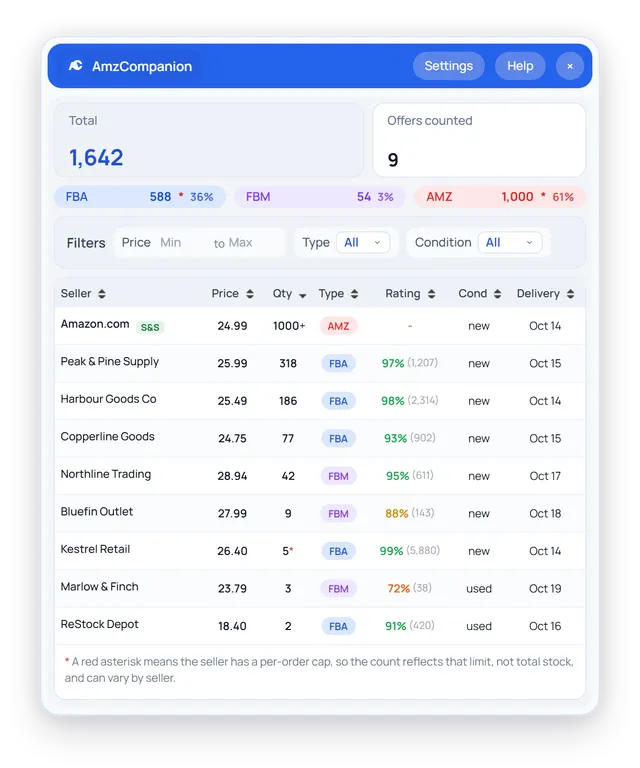
Watch it on a listing.
Short recordings on a made-up product with made-up sellers. The panel is drawn with the extension's own styles, so it looks just like it does in your browser.
Click AmzCompanion in the buy box and watch the offers fill in
It reads public product pages and leaves your account alone.
AmzCompanion sees Amazon listings the way any shopper does, and what you look up stays in your browser.
Only on Amazon product pages
It runs on Amazon storefronts and the AmzCompanion dashboard. Other sites you visit are left alone.
Never touches Seller Central
It only reads public product pages. Your Seller Central account is never opened.
Your cart is put back
To count an offer it adds it to the cart, reads the quantity and takes it out again. Anything you already had stays put.
Counts stay in your browser
Stock counts go from Amazon straight into your panel. Our servers only handle sign-in and billing.
One price a month, by how many browsers you use.
Every plan has the whole extension. You get 14 days free first, and you won't need a card.
Solo
For an independent seller checking listings on one browser.
$12USD / month
- 1 seat
- Email support
Plus
For a seller with a VA, or one person working across two machines.
$18USD / month
- 2 seats
- Email support
Scale
For a small sourcing team sharing the work.
$31USD / month
- 5 seats
- Priority email support
Every plan starts with a 14-day free trial, and you won't need a card. Pay yearly and save 30%. Prices are in USD. Lemon Squeezy bills you and handles sales tax and VAT. Cancel any time.
Questions sellers ask first.
How does AmzCompanion count a seller's stock?
For each offer it asks Amazon how many units it would let into a cart, then takes the item out again. That's how many a buyer could order from that seller right now. Anything already in your cart stays where it is.
How accurate are the numbers?
They're what Amazon will sell, which is usually the seller's available stock. When Amazon caps a count the panel shows 1000+. When a seller limits units per order you'll see a red asterisk. Read both as a minimum.
Does it count every seller on a listing?
It counts the offers Amazon loads in its offers panel. On a listing with dozens of sellers that may be the first batch. The Offers counted figure tells you how many went in.
Which Amazon marketplaces work?
Twenty storefronts: the US, Canada, Mexico, Brazil, the UK, Germany, France, Italy, Spain, the Netherlands, Sweden, Poland, Türkiye, the UAE, Saudi Arabia, Australia, Japan, India, Singapore and China.
Does it need access to Seller Central?
No. It works on the public product pages any shopper can see and never opens Seller Central.
Which browsers are supported?
Chrome and Firefox, from their official stores. Other Chromium browsers may install the Chrome version, but we only test on Chrome.
Do I need a card for the trial?
No. Install the extension and activate it with the link we email you, and your 14 days start. Pick a plan when you're ready.
What is a seat?
A seat is one browser signed in at a time. Solo has one, Plus has two and Scale has five. Sign out of a browser and its seat is free again.
See who holds the stock on your next listing.
Add AmzCompanion and activate it with the link we email you. You get 14 days with every feature, and you won't need a card.
Plans from $12 a month after the trial. Cancel any time.